
Download Mac Minder – Parental Control, Secure Mac Monitoring, Free Trial
Overview
Mac Minder is a premier parental‑control system designed specifically for macOS computers. Launched in the mid‑2000s, this trial‑version software belongs to the Internet software category with a focus on security and access control. The current version, 2.5, received its last update on October 23 2006 and continues to be distributed in English for Mac OS X and earlier Mac operating systems.
Although the tool is over a decade old, it still offers a lightweight footprint—consuming less disk space than many contemporary internet utilities—making it an attractive option for families that need a discreet, yet powerful, monitoring solution without bloating their system. Mac Minder’s core mission is to empower parents with real‑time visibility into their children’s online activity, while also providing the ability to set time limits, block inappropriate websites, and generate detailed usage reports. The software operates quietly in the background, logging visited URLs, chat sessions, and file transfers, then presenting the data through an intuitive dashboard that can be accessed locally or remotely.
Because it is offered as a trial, users can evaluate its feature set before committing to a full license, ensuring that the tool aligns with their family’s safety policies and technical expectations. Over 1,300 users have downloaded Mac Minder since its inclusion in the software catalog in 2006, reflecting a steady demand for reliable macOS‑specific parental controls.
Key Features
- Real‑time web monitoring – captures every URL visited, categorizes sites by age‑appropriateness, and alerts parents instantly.
- Application usage tracking – logs the launch time, duration, and frequency of installed apps, helping parents identify potential distractions.
- Customizable content filters – block specific domains, keywords, or entire categories (e.g., gambling, adult content) with a simple drag‑and‑drop interface.
- Time‑based access controls – set daily usage windows, enforce bedtime limits, and receive notifications when limits are approached.
- Detailed activity reports – generate PDF or HTML summaries that include browsing history, screen‑time charts, and flagged incidents.
- Remote administration – manage settings from another Mac or via a secure web portal, ensuring flexibility for parents on the go.
- Lightweight installation – occupies minimal disk space and consumes low CPU resources, preserving system performance.
- Secure data handling – all logs are encrypted locally, and optional cloud backup uses SSL/TLS encryption.
- Trial mode with full feature access – test every capability for a limited period before purchasing a full license.
Installation & Usage Instructions
Downloading and setting up Mac Minder is straightforward, even for users with limited technical experience. Follow these steps to get the software up and running on your Mac:
- Download the installer: Click the “Download Mac Minder” button below the article. The file is a compressed
.dmgpackage that contains the installer. - Mount the DMG: Double‑click the downloaded file. macOS will mount a virtual drive on your desktop.
- Run the installer: Drag the Mac Minder icon into your
Applicationsfolder, or double‑click the.pkgfile and follow the on‑screen prompts. You may be asked to enter an administrator password; this is required to install kernel extensions that enable deep system monitoring. - Launch the application: Open
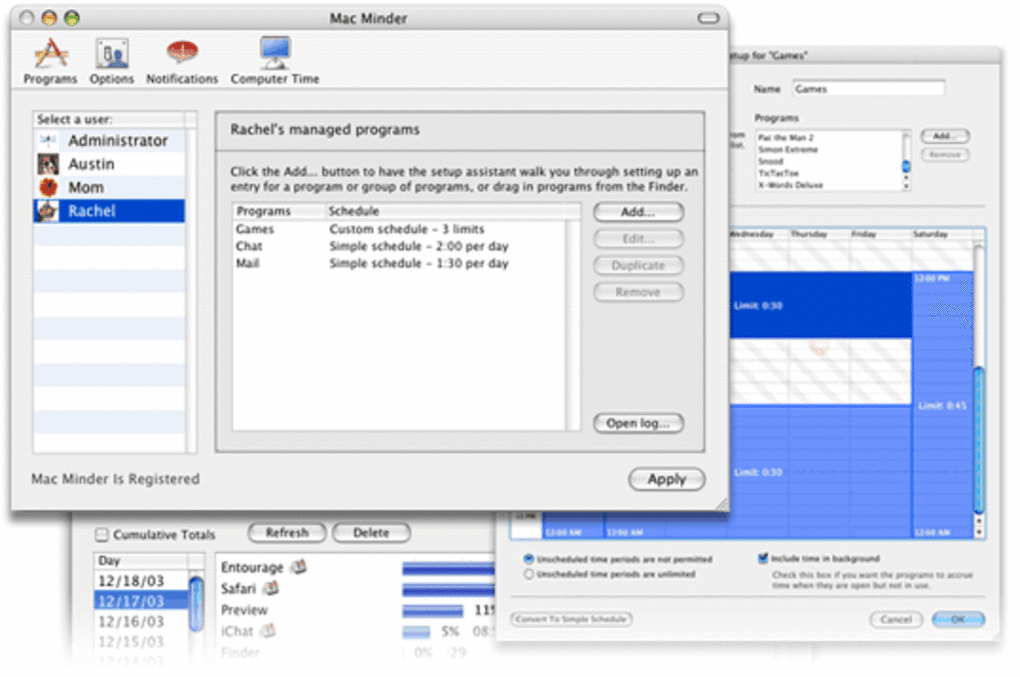
Mac Minderfrom the Applications folder. The first launch will trigger a brief setup wizard. - Configure parental profiles: Create a profile for each child, assigning age‑appropriate filters, time limits, and notification preferences. The wizard provides suggested defaults based on the child’s age, which you can fine‑tune later.
- Enable monitoring services: macOS will request permission to monitor network traffic and access usage data. Approve these requests to allow full functionality.
- Review the dashboard: After setup, the main dashboard displays a live summary of active sessions, recent sites visited, and any blocked attempts. Use the side menu to navigate to detailed reports, filter settings, or remote admin options.
- Set up remote access (optional): If you wish to manage Mac Minder from another device, enable the web portal under Settings → Remote Access. The system will generate a secure URL and a one‑time access token that you can bookmark on your smartphone or secondary Mac.
Mac Minder is compatible with macOS 10.4 (Tiger) through macOS 10.7 (Lion), making it suitable for older machines still in use in many households. For newer macOS releases, the software may require compatibility updates, which are not currently provided due to the last official update in 2006. Nevertheless, the trial version remains functional on legacy systems and can serve as a cost‑effective solution for families with older hardware.
Pros and Cons
Advantages
- Lightweight footprint – minimal impact on system performance.
- Comprehensive monitoring – covers web, applications, and file transfers.
- Highly customizable filters – suitable for a wide range of age groups.
- Remote management – parents can adjust settings from another Mac or via web portal.
- Free trial with full feature access – no hidden limitations during evaluation.
Drawbacks
- Last official update was in 2006 – may lack support for newer macOS versions.
- Interface appears dated compared to modern parental‑control apps.
- No native iOS or Android companion app for mobile notifications.
- Limited language support – currently English‑only.
- License purchase required for continued use after trial period.
Frequently Asked Questions
Is Mac Minder compatible with the latest macOS releases?
Mac Minder was last updated in 2006 and officially supports macOS 10.4 through 10.7. While the software may still run on newer versions, you could encounter compatibility warnings or missing features. For the most reliable experience, use it on supported legacy systems.
Can I monitor my child’s activity on iPhone or iPad?
No. Mac Minder is a macOS‑only application and does not provide mobile device monitoring. If you need cross‑platform coverage, consider complementary solutions that support iOS and Android.
How does the trial version differ from the paid license?
The trial version grants full access to every feature for a limited period (typically 14 days). After the trial expires, you must purchase a license to continue monitoring. The paid license also unlocks future updates—if they become available—and removes any trial reminders.
Is my child’s data stored securely?
Yes. All logs are encrypted on the local drive, and optional cloud backups use SSL/TLS encryption. Only users with the administrator password can access the raw data, helping protect privacy.
Can I set up multiple user profiles for different children?
Absolutely. Mac Minder allows you to create separate profiles, each with its own age‑based filters, time limits, and notification settings. This makes it easy to manage distinct rules for siblings of different ages.
Conclusion & Call to Action
Mac Minder remains a solid choice for families that run legacy Mac hardware and need a straightforward, low‑impact parental‑control solution. Its real‑time monitoring, granular filters, and remote administration capabilities deliver the core functions most parents look for, while the free trial allows you to test the software without commitment. However, the lack of recent updates and the absence of mobile integration mean it may not suit households that rely on the newest macOS versions or require cross‑device coverage. If your family uses older Macs and values a lightweight, secure monitoring tool, downloading the trial version today is a sensible first step. Should you need a more modern, multi‑platform solution, consider exploring newer alternatives after evaluating Mac Minder’s feature set.
Ready to protect your children’s online experience? Download Mac Minder now and start the free trial.
Pros: Lightweight, comprehensive monitoring, remote admin, free trial.
Cons: Outdated UI, no support for newer macOS, no mobile app.







